

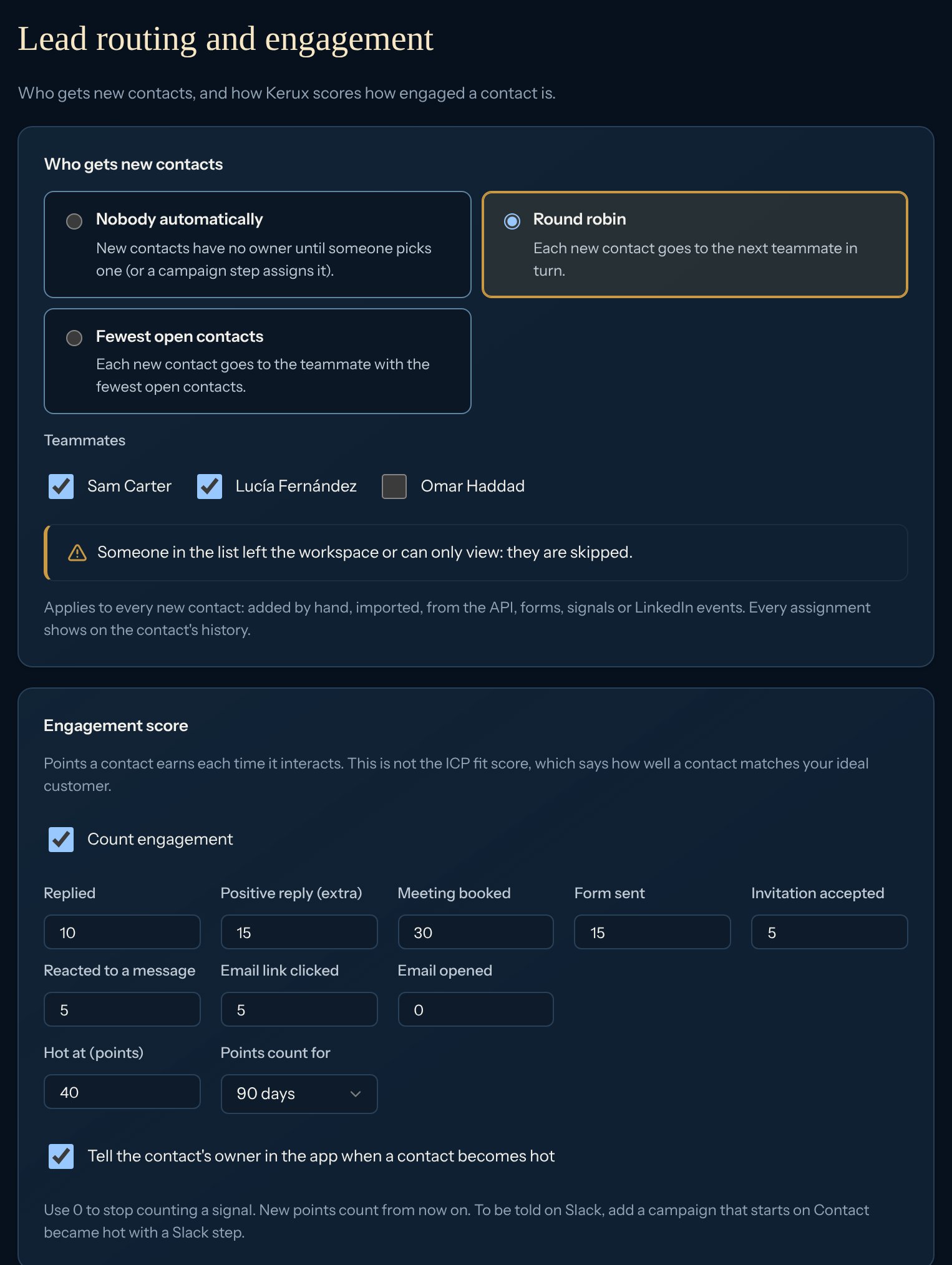
Who gets new contacts
It works for every new contact, however it comes in: added by hand, imported, from the API, a form, a signal or a LinkedIn event. Contacts that already have an owner are left alone. Every assignment shows on the contact’s history as Owner changed.
1
Open the settings
Click Settings > Lead routing.
2
Pick how
Under Who gets new contacts, click Round robin or Fewest open contacts.
3
Pick the teammates
Tick the teammates who should get contacts. It turns on as soon as one is ticked.
In a campaign
The Assign to teammate step can do the same: open the step and pick Round robin (each in turn) or Fewest open contacts under Who gets the contact, then tick the teammates. Each step keeps its own turn. A Create task for “the contact’s owner” right after it goes to the teammate it picked. See Team and AI steps.Engagement score
Each contact earns points every time it interacts with you. These are the defaults; change any of them under Engagement score (0 stops counting a signal, 100 is the most one signal can be worth). To stop counting altogether, untick Count engagement.
Each event counts once, however many times it reaches Kerux. A STOP text never counts.
The engagement score is not the ICP fit score. The ICP fit score says how well a contact matches your ideal customer; the engagement score says how much the contact interacts with you.
Hot contacts
When a contact’s score reaches Hot at (points) (50 by default), it becomes hot, once:- It shows a Hot badge on the contact page, and a star next to its score in the Contacts list.
- Its owner gets a notification in My tasks (owners and admins when it has no owner). Turn this off with Tell the contact’s owner in the app when a contact becomes hot.
- Campaigns with the Contact became hot Kerux event start (see Start a campaign from what happens in Kerux).
- Webhooks get
lead.engagement_hot(see Webhooks).
Points that fade
Under Points count for, pick 30, 60, 90 or 180 days to let old points fade (they stay in the contact’s history, marked as faded). A hot contact whose score falls back under the threshold is no longer hot, and can become hot again later. Always keeps points forever. New points and thresholds apply from now on; points a contact already earned stay as they were.See it on a contact
The contact page has an Engagement card with the score, since when it’s hot, and its latest signals. In Contacts, the Engagement column shows the score. Click Filters to show only Hot now or Any engagement, and pick Order: Highest engagement first.With the API
GET/PUT /v1/workspace/lead-assignment:mode(off,round_robin,least_open) anduser_ids.GET/PUT /v1/workspace/engagement:points,hot_threshold,decay_days,hot_alert,enabled.GET /v1/leads/{id}/engagement: the score,hot_atand the latest signals.GET /v1/leads?sort=engagement&hot=true&min_engagement=20; every contact hasengagement_scoreandengagement_hot_at.
Common problems
New contacts don't get an owner
New contacts don't get an owner
Check that Round robin or Fewest open contacts is picked and at least one teammate is ticked. Viewers and people who left the workspace are skipped; if nobody in the list can own contacts, new contacts stay without an owner.
A contact has points but isn't hot
A contact has points but isn't hot
Its score is under Hot at (points). Lowering the threshold makes contacts hot on their next signal.
A contact became hot but nothing started
A contact became hot but nothing started
Add the Contact became hot Kerux event to the campaign, and check the campaign is on. A contact becomes hot only once until it cools down.