

1
Open Review
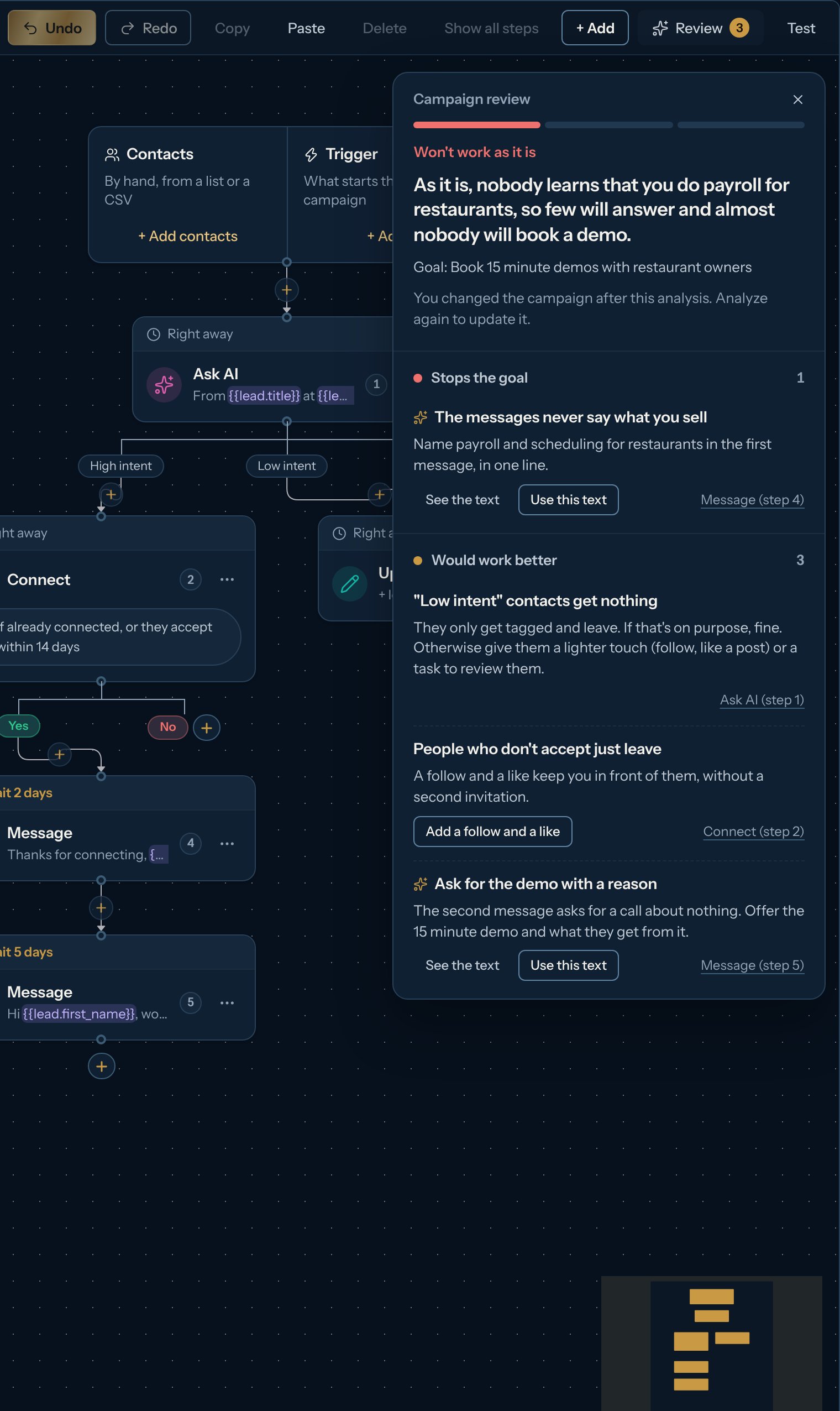
In the campaign’s Builder, click Review in the toolbar. The number on it is how many problems there are (in red) or, when there are none, how many tips (in gold); a check mark means nothing was found. It is checked again on every change, so the number goes down as you fix things.
2
Read what it found
At the top, a bar with three parts and the bottom line: Won’t work as it is (one part, red), Needs work (two) or Ready (three, gold), with the AI’s sentence when it has given its opinion. Below, what to fix in two groups: Stops the goal (for example: people who accept never get a message, or no message asks for anything) and Would work better (a follow-up, a path for people who don’t accept, a message that names your offer). Each line says what is wrong and what to change; the step’s name at the right of the line opens it. Lines from the AI have a small sparkle.
3
Fix in one click
- Add a follow-up: adds a wait and a follow-up message after the step, and opens it so you can adjust the text.
- Add a follow and a like: people who don’t accept your invitation get a follow right away and a like 5 days later, so they still see you.
- The step’s name (for example Message (step 4)): opens the step to change it.
- Tell Kerux what you sell: opens your business profile (Settings > Business profile). Without it, nothing can check that the messages fit your offer.
4
Ask the AI for its opinion (Pro)
Click Ask the AI for its opinion. The AI reads the whole campaign and your business profile, and tells you the goal it sees, an honest bottom line (Ready, Needs work or Won’t work as it is) and up to five things to change. For a weak message it writes a new one: See the text shows the step’s text Now (struck through) and the Suggested one, and Use this text puts it in the step. Nothing changes until you click. The AI’s opinion is part of Pro, Agency and the free trial; viewers don’t see the button. If the AI isn’t available or can’t answer, the panel says so and the checks above still apply.
If you change the campaign after the AI’s opinion, Review says so: click Analyze again to update it. The checks themselves are always up to date and never use credits.